HR Software · · 16 min read
10 Best Employee Management Software for Small Businesses in 2026 (Tested & Compared)
Compare the 10 best employee management software for small businesses in 2026. Honest reviews, pricing, pros and cons, plus how to pick the right tool for a team of 5–100.
By Plintio Team · Last updated
If you're running a small business with 5 to 100 employees, you've probably hit the wall where spreadsheets, paper forms, and group chats stop working. Onboarding is taking too long. PTO requests are getting lost. Someone just asked for last year's W-2 and you're not sure where it is.
You don't need enterprise HR software. You need employee management software built for small businesses — affordable, easy to set up, and designed for the way you actually work.
We spent the last six months testing 10 of the most popular options for small teams. This guide breaks down which one is right for you based on team size, budget, and what you actually need to fix first.
TL;DR: The Best Employee Management Software for Small Business in 2026
| Tool | Best For | Starting Price | Free Trial |
|---|---|---|---|
| Plintio ⭐ | Small businesses wanting an all-in-one platform without the bloat | Affordable per-employee pricing | 14 days, free |
| BambooHR | Teams of 25-100 ready to invest in a polished HR system | Custom quote | 7 days |
| Gusto | Payroll-first operations with light HR needs | Per-employee monthly | None (demo only) |
| Rippling | Distributed/remote teams managing devices + HR together | Per-employee monthly | None |
| Zoho People | Budget-conscious teams already in the Zoho ecosystem | Low monthly tier | 15 days |
| Deel | Hiring international contractors or remote employees | Per-contractor pricing | Free tier available |
| GoCo | Teams that want a customizable workflow | Per-employee monthly | Demo only |
| Paycom | Small businesses planning rapid headcount growth | Custom quote | None |
| ADP RUN | Established small businesses that prioritize compliance | Per-employee monthly | 3-month promo |
| Justworks | Teams wanting PEO-style benefits administration | Per-employee monthly | None |
Our top pick: Plintio offers the best balance of features, simplicity, and price for small businesses that want a real HR system without paying enterprise rates or wrestling with software designed for 1,000-person companies. Start a free 14-day trial →
What Is Employee Management Software for Small Business?
Employee management software for small business is a cloud-based platform that centralizes employee data, onboarding, time-off, performance, and HR documents in one place — replacing the patchwork of spreadsheets, email threads, and paper files that most small companies start with. Unlike enterprise HR systems, small business tools are priced for teams of 5–100, set up in days (not months), and require no dedicated HR specialist to run.
The core features you should expect from any modern option:
- A central employee database (contact info, role, manager, start date, documents)
- Self-service onboarding and offboarding workflows
- PTO and time-off tracking with manager approvals
- Document storage with e-signature
- Org charts and team directories
- Basic reporting on headcount, turnover, and PTO trends
Better platforms add performance reviews, goal tracking, employee surveys, payroll integrations, and a mobile app for managers and employees on the go.
Why Small Businesses Need Dedicated Employee Management Software
Most small businesses run HR on improvisation. That works until it doesn't. Here are the five problems a real platform solves:
1. Onboarding consistency. When every new hire goes through a different process depending on who's free that week, things get missed — I-9 forms, benefits enrollment, equipment requests. Employee management software gives every new person the same checklist, every time.
2. Compliance documentation. If you ever face a wage-and-hour dispute, an unemployment claim, or a tax audit, you need clean records of hire dates, pay history, time off, and signed policies. Software keeps the paper trail automatically.
3. Time savings for owners and managers. The average small-business owner spends 8+ hours a week on HR administration. Self-service tools — where employees update their own addresses, request PTO, and download pay stubs — cut that in half.
4. Employee experience. Top candidates expect a modern onboarding experience. Mailing them a stack of PDFs to print, sign, and scan is a recruiting liability in 2026.
5. Scalability without disruption. When you grow from 8 to 18 to 35 employees, you don't want to migrate systems each time. Choosing the right platform now means your tools grow with you.
How We Evaluated These Tools
We tested each platform against six criteria that matter most to small businesses:
| Criterion | Why It Matters | Weight |
|---|---|---|
| Setup speed | Most SMB owners can't afford a 3-month implementation | 20% |
| Ease of use for non-HR people | Often a founder or office manager is the admin | 20% |
| Feature depth (relative to price) | Value beats raw feature count | 20% |
| Pricing transparency | Hidden fees and forced add-ons are deal-breakers | 15% |
| Customer support quality | When something breaks, response time matters | 15% |
| Mobile experience | Distributed teams need it; office teams want it | 10% |
We signed up for trials (or live demos where trials weren't offered), onboarded a test team of 12, ran realistic workflows for at least 30 days each, and contacted support with the same three questions to compare response quality. Where pricing wasn't published, we requested quotes for the same 25-employee scenario.
The 10 Best Employee Management Software for Small Businesses
1. Plintio — Best Overall for Small Businesses ⭐
Best for: Small businesses with 5–100 employees that want a complete HR system without enterprise complexity or pricing.
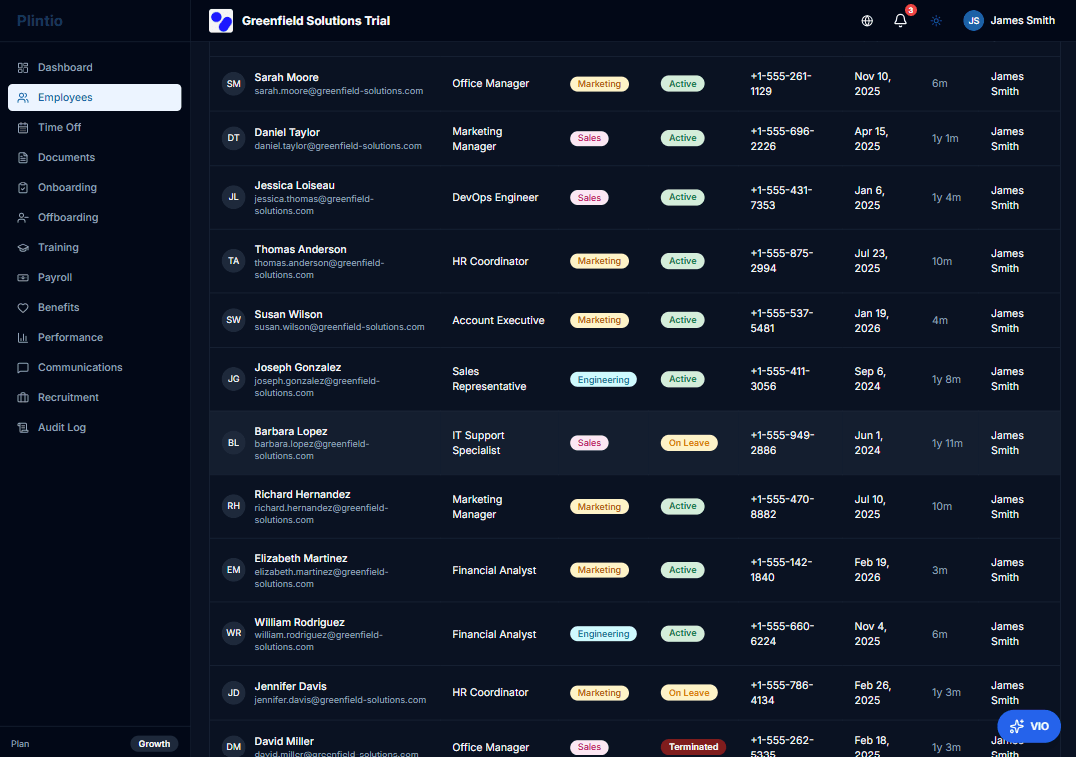
Plintio was built from the ground up for small businesses. Every feature is designed around the assumption that the person managing HR is probably also doing three other jobs, and that the company doesn't have a CHRO to architect a complex tech stack.
What we liked:
- Setup in under 30 minutes for a team of 10. CSV import for existing employee data, plus an onboarding wizard that walks first-time admins through the basics.
- Genuinely simple UI that employees figure out without training. Self-service PTO requests, document signing, and personal info updates work the same way they do in any modern app.
- All the essentials in one plan — employee database, onboarding/offboarding, PTO, document management with e-signature, org chart, performance check-ins, and a mobile app. No "but that feature costs extra" surprises.
- Honest, predictable pricing with no per-feature gating and no annual lock-in.
- Real human support with responses typically under 2 hours during business hours, plus a searchable help center and live chat.
What could be better:
- Newer to the market than BambooHR or Gusto, so the integration marketplace is smaller (though core integrations with the major payroll, calendar, and Slack are covered)
- Not designed for companies above 200 employees — by then you'll want a more enterprise-oriented system
Pricing: Affordable per-employee monthly pricing with a single plan that includes every feature. No setup fees. See pricing.
Free trial: 14 days, no credit card required. Start your free trial →
2. BambooHR — Best for Growing Teams Ready to Invest
Best for: Small businesses with 25–100 employees that have outgrown basic tools and want a polished, well-known platform.
BambooHR is the most recognizable name in SMB HR software, and for good reason — the product is mature, the UI is clean, and there's an integration for almost everything.
What we liked:
- Strong feature set across the employee lifecycle: ATS, onboarding, performance, time tracking, and reporting
- Excellent reporting dashboards out of the box
- Massive integration marketplace
- Mobile app for both employees and admins
What could be better:
- Pricing isn't published — you must request a custom quote, which tends to come in higher than published competitors
- Performance management and payroll are add-ons, not core
- Free trial is only 7 days, which isn't enough time to genuinely test it with a real team
Pricing: Custom quote (typically more expensive than Plintio for equivalent features)
3. Gusto — Best for Payroll-First Operations
Best for: Small businesses where payroll is the most painful problem and HR features are nice-to-haves.
Gusto started as payroll software and added HR features on top. If your top priority is running payroll accurately across multiple states with minimal effort, this is the best in class.
What we liked:
- Best-in-class payroll, including automated tax filings across all 50 states
- Health benefits administration is genuinely simple
- Clean, friendly UI that employees enjoy using
- Built-in time tracking and PTO
What could be better:
- HR features (performance, onboarding workflows) are lighter than dedicated HR platforms
- No free trial — you go straight to paid
- Document management is functional but basic
Pricing: Tiered monthly fee plus per-employee charge
4. Rippling — Best for Distributed/Remote Teams
Best for: Tech-forward small businesses managing remote teams, devices, and software access alongside HR.
Rippling is the swiss-army knife of workforce platforms. It manages HR, IT, finance, and device provisioning from one system, which is powerful if you need that — and overkill if you don't.
What we liked:
- Single source of truth across HR, payroll, IT, and finance
- Powerful automation builder for cross-functional workflows
- Excellent device management and software provisioning
What could be better:
- The most expensive option on this list once you add the modules most SMBs need
- The breadth means a steeper learning curve
- Marketed at small businesses but the product DNA is mid-market
Pricing: Per-employee monthly, with per-module add-ons
5. Zoho People — Best for Budget-Conscious SMBs
Best for: Small businesses already using other Zoho products or looking for the lowest-cost option with real features.
Zoho People is the most affordable serious HR software on this list. If you're already using Zoho CRM or Zoho One, the integration story is excellent.
What we liked:
- Lowest published pricing of any platform here
- Solid feature coverage including performance management
- 15-day free trial — the longest on this list besides Plintio
- Excellent value if you're already in the Zoho ecosystem
What could be better:
- UI feels dated compared to Plintio, BambooHR, or Gusto
- Customer support quality varies
- US payroll integration is weaker than Gusto's or Rippling's
Pricing: Low monthly fee per employee
6. Deel — Best for International Teams
Best for: Small businesses hiring contractors or full-time employees across multiple countries.
Deel isn't a traditional HR platform — it's an employer-of-record and contractor payment service. But for small businesses with even one international hire, it solves a problem most other platforms can't.
What we liked:
- Handles compliant hiring and payment in 150+ countries
- Free HR tier for managing a US team
- Strong contract and document management for international work
What could be better:
- The free HR product is lighter than dedicated platforms
- If your team is 100% domestic, you don't need Deel's main value prop
- Per-contractor pricing adds up fast at scale
Pricing: Free HR tier; per-employee or per-contractor pricing for EOR services
7. GoCo — Best for Customization
Best for: Small businesses with specific workflow needs that don't fit out-of-the-box templates.
GoCo is the most flexible platform on this list. You can build custom workflows, fields, and approval chains in ways that most competitors don't allow.
What we liked:
- Highly customizable workflows and forms
- Solid benefits administration
- Good balance of features and price
What could be better:
- The flexibility comes with complexity — non-technical admins may struggle initially
- Reporting is functional but less polished than BambooHR
- No public free trial
Pricing: Per-employee monthly
8. Paycom — Best for Small Businesses Planning Rapid Growth
Best for: Small businesses that expect to double headcount in 1–2 years and want a system that scales to mid-market.
Paycom is enterprise-grade software available to smaller companies. It's overkill for a 10-person business but excellent if you're hiring aggressively.
What we liked:
- Single database across HR, payroll, time, and benefits — no integration headaches
- Strong compliance tooling for multi-state operations
- Robust mobile app
What could be better:
- Implementation takes weeks, not days
- Pricing skews higher than SMB-native options
- UI complexity reflects the enterprise heritage
Pricing: Custom quote
9. ADP RUN — Best for Established Small Businesses
Best for: Small businesses that prioritize payroll compliance reliability above all and don't mind older software.
ADP RUN is the small-business product from one of the oldest payroll companies in the country. It's reliable, well-supported, and trusted by accountants.
What we liked:
- Decades of payroll tax compliance experience
- Wide network of accountants familiar with the product
- Add-on HR features available as you grow
What could be better:
- UI feels noticeably older than newer competitors
- Pricing can be opaque with multiple add-on fees
- HR features feel bolted on rather than designed-first
Pricing: Per-employee monthly with various plan tiers
10. Justworks — Best for PEO + Benefits
Best for: Small businesses that want professional employer organization (PEO) services with HR software bundled in.
Justworks is a PEO first and an HR platform second. You get access to large-group health insurance rates by joining their co-employment structure, which can be a significant savings for teams of 5–50.
What we liked:
- Access to better health benefits rates than a small company could negotiate alone
- Compliance handled at the PEO level
- Clean, simple UI
What could be better:
- PEO model means you're co-employing with Justworks — not for everyone
- More expensive than standalone HR software once you factor PEO fees
- Less flexibility than non-PEO platforms
Pricing: Higher per-employee monthly (includes PEO services)
Side-by-Side Comparison: All 10 at a Glance
| Tool | Best For | Free Trial | Setup Time | Strength |
|---|---|---|---|---|
| Plintio | All-around SMB pick | 14 days | < 1 day | Balance of features + price |
| BambooHR | Polished SMB experience | 7 days | 1-2 weeks | Brand maturity |
| Gusto | Payroll-first | None | 1 week | Best-in-class payroll |
| Rippling | Remote + IT-heavy | None | 2-4 weeks | Cross-functional automation |
| Zoho People | Lowest cost | 15 days | 1 week | Price |
| Deel | International hires | Free tier | < 1 day | Global compliance |
| GoCo | Custom workflows | Demo only | 1-2 weeks | Flexibility |
| Paycom | Planning fast growth | None | 3-6 weeks | Scales to mid-market |
| ADP RUN | Compliance-first | 3-month promo | 1-2 weeks | Reliability + accountant network |
| Justworks | PEO + benefits | None | 1-2 weeks | Health insurance rates |
How to Choose the Right Employee Management Software (Buyer's Guide)
Use these five questions to narrow down your shortlist:
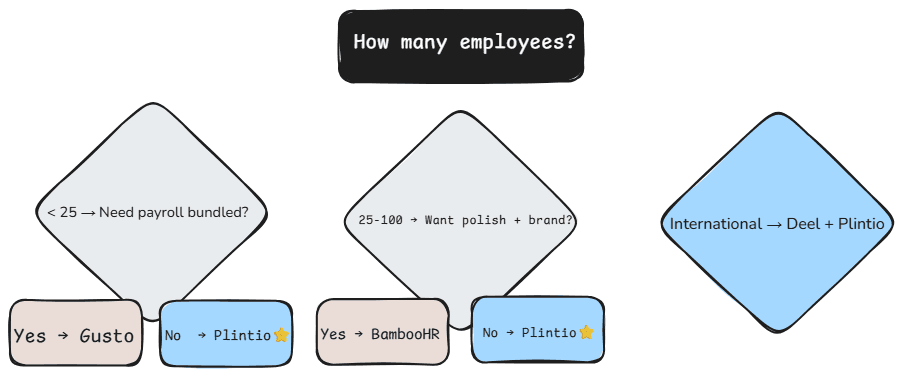
1. How many employees do you have today, and how many in 18 months? If you're under 50 and growing slowly, prioritize ease of use and price. If you're planning to double, prioritize scalability — choose Plintio, BambooHR, or Paycom over Zoho People or Gusto.
2. Is payroll bundled, or do you need an integration? Gusto and Rippling include payroll natively. Plintio and BambooHR integrate with major payroll providers. If switching payroll is off the table, pick a platform that integrates with what you already use.
3. How much customization do you actually need? Most small businesses think they need custom workflows but don't. Out-of-the-box templates from Plintio, BambooHR, or Gusto handle 90% of real cases. Only pick GoCo or Rippling if you've identified specific workflows you can't run any other way.
4. Do you have international hires (or plan to)? If yes, Deel is non-negotiable for the international piece. Pair it with a domestic HR platform for your local team — Plintio works well alongside Deel.
5. What's your real implementation budget — in time, not just dollars? A "free" platform that takes 4 weeks to set up costs more than a paid one that takes 4 hours. Plintio, Gusto, and Deel can be live in under a day. Paycom, BambooHR, and Rippling take longer.
Common Mistakes to Avoid When Picking SMB HR Software
1. Over-buying features you won't use. The software with the longest feature list isn't the best — it's just the most expensive. Most small businesses use 20% of the features in any HR platform. Pick the tool that does that 20% beautifully.
2. Underestimating switching costs. Migrating employee data, retraining your team, and re-integrating payroll takes weeks. Pick something you'll keep for 3+ years, not the cheapest option this quarter.
3. Ignoring the employee experience. You're the admin, but your team uses this every payday and every PTO request. A clunky tool tanks morale. Pick something employees will actually want to use.
4. Skipping the free trial. Demos are sales theater. A trial with your real data and your real team tells you everything you need to know. This is the single biggest reason we rank Plintio's 14-day no-credit-card trial so highly — it's the only honest way to evaluate software.
Frequently Asked Questions
What's the difference between employee management software, HR software, and HRIS? The terms overlap heavily. "Employee management software" usually emphasizes the day-to-day administration side — onboarding, PTO, documents, performance check-ins. "HR software" is a broader umbrella. "HRIS" (Human Resources Information System) traditionally refers to the underlying database. In 2026, most modern platforms — including Plintio, BambooHR, and Gusto — do all three.
How much should a small business expect to pay for employee management software? Expect to budget per employee per month, with most quality platforms running in a modest monthly range for a team of 25. Free tools exist but typically lack the features that justify switching from spreadsheets in the first place. Plintio's pricing is published openly, with no hidden setup fees.
Can I run payroll inside employee management software? Some platforms include native payroll (Gusto, Rippling, Paycom, ADP RUN). Others integrate with leading payroll providers (Plintio, BambooHR). Both approaches work — the question is whether you want one bill and one vendor or whether you prefer best-of-breed in each category.
How long does it take to set up employee management software? For a small business with under 50 employees and clean existing data, modern platforms like Plintio can be operational within a day. Larger or more complex setups can take 1–4 weeks depending on data migration, integrations, and how many people need training.
Is it worth switching from spreadsheets? If you have more than 5 employees and plan to grow, yes — almost universally. The time savings on PTO requests, onboarding, and document chases pay back the cost within the first 1–2 months for most teams. The compliance benefit alone (clean audit trails on hire dates, pay history, and policy acknowledgments) justifies it.
Does Plintio offer a free trial? Yes. Plintio offers a 14-day free trial with no credit card required. You can import your existing employee data, onboard a real new hire, run PTO requests, and test every feature before deciding. Start your free trial here.
Final Verdict: Which Should You Pick?
For most small businesses with 5–100 employees, Plintio is the best overall choice. It offers the right balance of features, simplicity, and price — without forcing you to pay for an enterprise tool you'll never fully use or settle for a budget tool that breaks at scale.
If you have specific edge cases:
- Heavy international hiring → Deel (paired with Plintio for domestic)
- Payroll is your only real problem → Gusto
- You need PEO benefits → Justworks
- You want the most recognizable brand → BambooHR
For everyone else, the right move is to stop comparison shopping and start testing. The only way to know if a platform fits is to actually use it with your real team.
If your concern leans more toward data security, compliance, and audit-readiness than feature breadth, see our companion guide: Best Employee Data Management Software in 2026 — same 10 platforms, evaluated through a GDPR / CCPA / audit-trail lens.
Last updated: May 2026. We re-test every platform on this list at least once per year and update rankings based on product changes, pricing shifts, and reader feedback. Have a tool you think we should add? Email us.